Microsoft Intune

Manage devices and applications using Microsoft Intune with guides on endpoint security, compliance, and mobile device management.

Laptop connecting automatically to Microsoft Intune and Entra ID during Windows Autopilot zero-touch setup
Microsoft Intune

Windows Autopilot Deployment Guide (Real-World Setup)

Home > Microsoft Intune > Windows Autopilot Deployment Guide (Real-World Setup) Last Updated: July 2026 Windows Autopilot is Microsoft’s zero-touch provisioning service that lets a brand-new or reassigned Windows device configure itself the first time it powers on. In real-world deployments, the hardware hash is registered by the OEM or reseller at the time of […]

Banner illustrating Intune auto-enrollment setup for hybrid Azure AD joined Windows devices, Core365 Cloud
Microsoft Intune

Intune Auto-Enrollment for Hybrid Azure AD Join (2026)

Home ›Microsoft Intune ›Intune Auto-Enrollment for Hybrid Azure AD Join Last Updated: July 2026 Quick answer: To enable Intune auto-enrollment for hybrid Azure AD join, configure device sync in Microsoft Entra Connect, then enable the “Enable automatic MDM enrollment using default Azure AD credentials” Group Policy on your domain-joined OU. As a result, devices register

Cloud Identity Enterprise Security Microsoft Intune PKI & Certificates

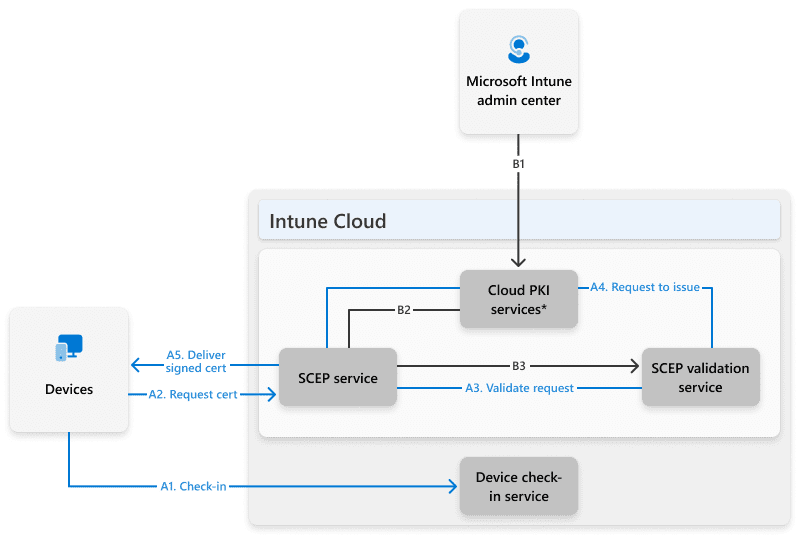
Microsoft Intune Cloud PKI: A Deep Technical Dive into Architecture, Security, and Deployment

Estimated Reading Time: 18–20 minutes Public Key Infrastructure (PKI) has always been a necessary evil in enterprise IT—powerful, security‑critical, and operationally complex. With the introduction of Microsoft Intune Cloud PKI, Microsoft is transforming traditional PKI into a fully cloud‑native, managed service tightly integrated with endpoint management and identity. This article provides a deep technical exploration

Scroll to Top
×